本文轉載自

How I Work: Bill Gates
Not much of a paper chase for Microsoft's chairman, who uses a range of digital tools to do business.
Bill Gates, chairman and chief software architect, Microsoft, U.S.A.
April 7, 2006: 5:17 PM EDT
NEW YORK (FORTUNE) - It's pretty incredible to look back 30 years to when Microsoft (Research) was starting and realize how work has been transformed. We're finally getting close to what I call the digital workstyle.
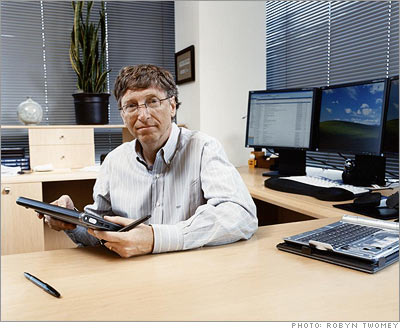
If you look at this office, there isn't much paper in it. On my desk I have three screens, synchronized to form a single desktop. I can drag items from one screen to the next. Once you have that large display area, you'll never go back, because it has a direct impact on productivity.
The screen on the left has my list of e-mails. On the center screen is usually the specific e-mail I'm reading and responding to. And my browser is on the right-hand screen. This setup gives me the ability to glance and see what new has come in while I'm working on something, and to bring up a link that's related to an e-mail and look at it while the e-mail is still in front of me.
At Microsoft, e-mail is the medium of choice, more than phone calls, documents, blogs, bulletin boards, or even meetings (voicemails and faxes are actually integrated into our e-mail in-boxes).
I get about 100 e-mails a day. We apply filtering to keep it to that level—e-mail comes straight to me from anyone I've ever corresponded with, anyone from Microsoft, Intel, HP, and all the other partner companies, and anyone I know. And I always see a write-up from my assistant of any other e-mail, from companies that aren't on my permission list or individuals I don't know. That way I know what people are praising us for, what they are complaining about, and what they are asking.
We're at the point now where the challenge isn't how to communicate effectively with e-mail, it's ensuring that you spend your time on the e-mail that matters most. I use tools like "in-box rules" and search folders to mark and group messages based on their content and importance.
I'm not big on to-do lists. Instead, I use e-mail and desktop folders and my online calendar. So when I walk up to my desk, I can focus on the e-mails I've flagged and check the folders that are monitoring particular projects and particular blogs.
Outlook also has a little notification box that comes up in the lower right whenever a new e-mail comes in. We call it the toast. I'm very disciplined about ignoring that unless I see that it's a high-priority topic.
Staying focused is one issue; that's the problem of information overload. The other problem is information underload. Being flooded with information doesn't mean we have the right information or that we're in touch with the right people.
I deal with this by using SharePoint, a tool that creates websites for collaboration on specific projects. These sites contain plans, schedules, discussion boards, and other information, and they can be created by just about anyone in the company with a couple of clicks.
Right now, I'm getting ready for Think Week. In May, I'll go off for a week and read 100 or more papers from Microsoft employees that examine issues related to the company and the future of technology. I've been doing this for over 12 years. It used to be an all-paper process in which I was the only one doing the reading and commenting. Today the whole process is digital and open to the entire company.
I'm now far more efficient in picking the right papers to read, and I can add electronic comments that everyone sees in real time.
Microsoft has more than 50,000 people, so when I'm thinking, "Hey, what's the future of the online payment system?" or "What's a great way to keep track of your memories of your kid?" or any neat new thing, I write it down. Then people can see it and say, "No, you're wrong" or "Did you know about this work being done at such-and-such a place?"
SharePoint puts me in touch with lots of people deep in the organization. It's like having a super-website that lets many people edit and discuss—far more than the standard practice of sending e-mails with enclosures. And it notifies you if anything comes up in an area you're interested in.
Another digital tool that has had a big effect on my productivity is desktop search. It has transformed the way I access information on my PC, on servers, and on the Internet. With larger hard drives and increasing bandwidth, I now have gigabytes of information on my PC and servers in the form of e-mails, documents, media files, contact databases, and so on.
Instead of having to navigate through folders to find that one document where I think a piece of information might be, I simply type search terms into a toolbar and all the e-mails and documents that contain that information are at my fingertips. The same goes for phone numbers and email addresses.
Paper is no longer a big part of my day. I get 90% of my news online, and when I go to a meeting and want to jot things down, I bring my Tablet PC. It's fully synchronized with my office machine so I have all the files I need. It also has a note-taking piece of software called OneNote, so all my notes are in digital form.
The one low-tech piece of equipment still in my office is my whiteboard. I always have nice color pens, and it's great for brainstorming when I'm with other people, and even sometimes by myself.
The whiteboards in some Microsoft offices have the ability to capture an image and send it up to the computer, almost like a huge Tablet PC. I don't have that right now, but probably I'll get a digital whiteboard in the next year. Today, if there's something up there that's brilliant, I just get out my pen and my Tablet PC and recreate it.
Days are often filled with meetings. It's a nice luxury to get some time to go write up my thoughts or follow up on meetings during the day. But sometimes that doesn't happen. So then it's great after the kids go to bed to be able to just sit at home and go through whatever e-mail I didn't get to. If the entire week is very busy, it's the weekend when I'll send the long, thoughtful pieces of e-mail. When people come in Monday morning, they'll see that I've been quite busy— they'll have a lot of e-mail.
Next: See the 2006 FORTUNE 500
FORTUNE 1000 Companies in Your State 
許多書籍探討 Bill Gates 與 Microsoft 成功的故事 (可惜 Microsoft 合夥人的細節總是交代不清楚),但沒有提到這位日理萬機的世界首富是怎樣工作的,而 CNNMoney.com 刊載了 Bill Gates 的親身說法 [
How I Work: Bill Gates]。
Bill Gates 已經完全電子化,所以他說很少需要在辦公室用紙,而且他很重視同步化工具的使用,這都是我目前無法達到的,對我來說,分析 codec algorithm 需要以紙筆演繹、分析 reports 需要以筆作眉批、填寫公文需要無謂的用紙、... 這些都很不環保而且沒效率,應該要好好改進才是。
日本趨勢大師大前研一在新書《
專業:你的唯一生存之道》提到一個特別的觀點:邁入日新月異的科技時代,AC 與 BC (耶穌誕生前後紀元) 的重要性可能會被 AG 與 BG (Bill Gates 在 Microsoft Windows 的成功) 所取代,這是一個新的指標,或許誇大了些,不過這也明白地聲明,唯有更妥善使用新紀元的科技、以更有效率的方式去克服挑戰、用寬廣的心胸看待種種變化,以及加強特定領域的專業,才是在 AG 紀元生存之道。